Your words stay close.
Speech recognition, search, and answers run on your Mac. Models download only when you choose; processing works offline after setup. There’s no silent cloud fallback.
A little less cloud. A lot more yours.
Local transcription. Searchable meeting memory. Yours.
Turn agreed-on conversations into searchable memory, with local transcription on your Mac and answers that lead back to the source.
Apple Silicon macOS 15+ Experimental preview
A closer look
Your library, your questions, the words behind the answer. A preview of the Mac app with fictional meetings.
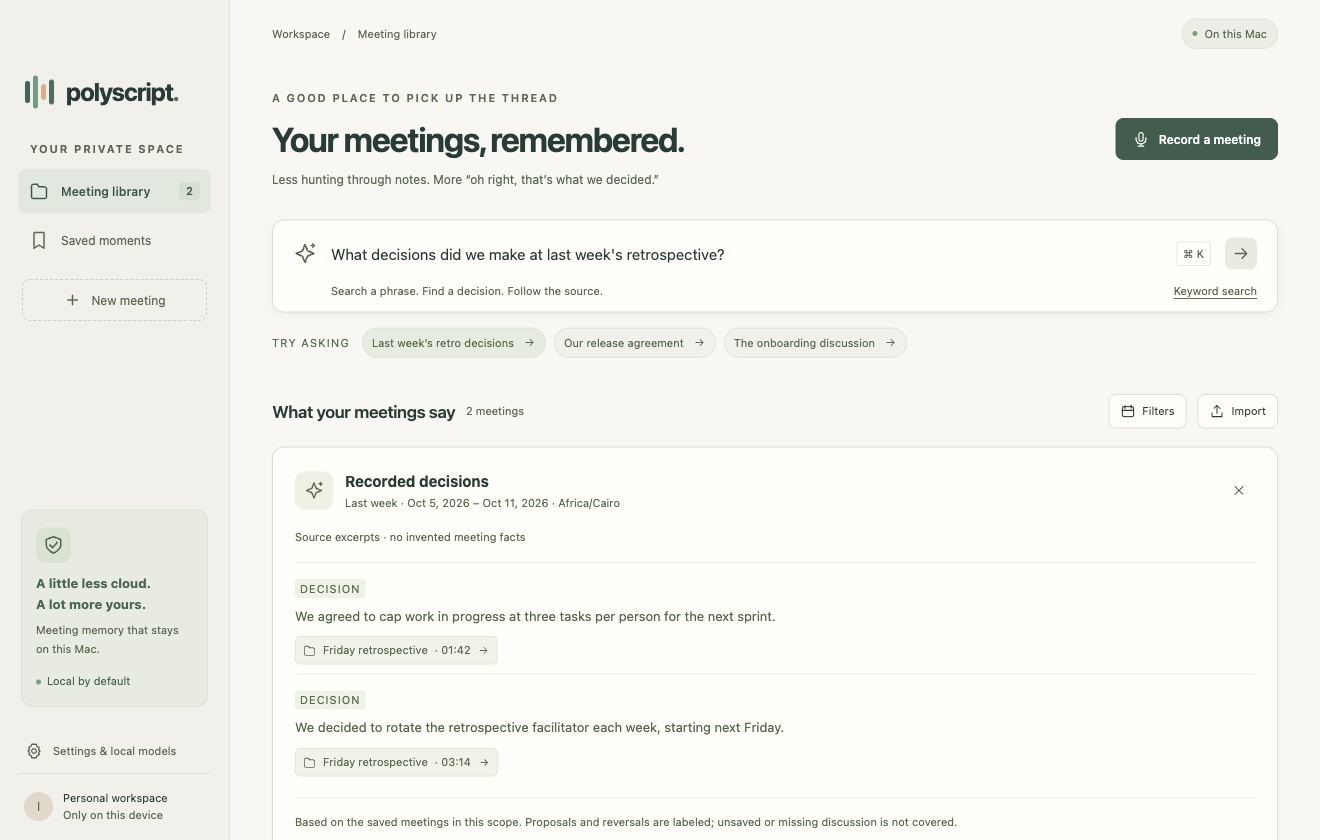
Ask about a decision. Get the supporting excerpts, with meeting and timestamp links.
A question, not a scavenger hunt
Search a phrase. Revisit a decision. Follow a loose end.
Your meeting library gives you somewhere to start.
“What decisions did we make at last week’s retrospective?”
A recorded decision
“We decided to rotate the retrospective facilitator each week, starting next Friday.”
A quotation from the fictional demo. In the app, every claimed decision links back to its supporting passage.
Also worth asking
What did we agree about the release?Which questions are still unresolved?A thoughtful little workflow
Polyscript keeps the path from a meeting to a useful memory simple.
Ask everyone involved. Agree on transcription and how the transcript may be used before recording or importing.
Transcribe locally. Choose whether to save the transcript for search and questions, within that agreement.
Find decisions and open their sources. Correct a passage, bookmark a moment, or export when the agreement allows.
Built with boundaries
A meeting is a shared conversation. Its transcript deserves the same care.
Speech recognition, search, and answers run on your Mac. Models download only when you choose; processing works offline after setup. There’s no silent cloud fallback.
Every recording or import needs fresh permission and an agreement covering its intended use. Ask before you start. Don’t use or share transcripts outside that agreement.
Answers cite supporting passages. Proposals and decisions stay distinct, and missing evidence stays visible. A transcript can support an answer; it can’t fill in an unrecorded conversation.
Polyscript is not permitted in interviews. When it detects one, it stops ongoing work, discards transient session data, and exits immediately. Detection is a contextual heuristic and can miss a session; consent does not make interview use permitted.
A few things to know
The details matter, especially
when they’re your words.
Polyscript’s speech recognition and meeting recall run locally. It doesn’t upload recordings, transcripts, questions, or embeddings to an AI provider. Optional model files are downloaded only after an explicit setup action. Once set up, the core processing works offline.
Yes. The Mac app supports TXT, SRT, and VTT transcripts, as well as audio imports. Each import requires fresh permission and an agreement covering the uses you enable. You can keep a session transient or choose to save it for later recall.
Saved transcripts and indexes are stored locally with restricted file permissions. The current beta does not add application-level encryption. Removing a transcript from Polyscript also removes its searchable sources, but copies you export, original imports, and backups need to be managed separately.
Polyscript says when supporting evidence is missing. Its answers describe the authorized saved sources in the selected scope. A missing match doesn’t mean the discussion never happened, and the app doesn’t invent a decision, owner, or deadline to fill the gap.
The preview targets Apple Silicon Macs running macOS 15 or later. It is ad-hoc signed and not notarized, so macOS may require an explicit first-launch approval. Physical installation, microphone permission, and accessibility qualification are still pending. Local models need memory and disk space. See the download and installation guide.
No. Interview use is prohibited, even with consent. A detected interview causes immediate shutdown with no override or resume. Detection is imperfect, so you must not rely on it to make an interview session permitted. Polyscript provides no interview coaching, suggested participant responses, or cheating assistance.
Mac preview · Ready to try
Bring your meeting memory home. Download the experimental preview for Apple Silicon, then start with a fictional demo.
Download for Macv0.1.0-beta.1 · macOS 15+ · 197 MB ZIP
Ad-hoc signed; not notarized. Installation & checksum